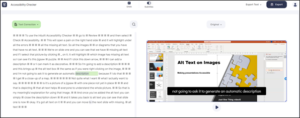
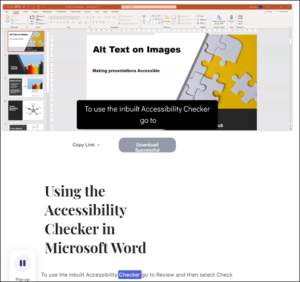
Type Studio – A creative tool that enables you to do quick edits without needing any video editing skills.
If you are creating videos for learners to study independently, then there is a very creative tool that enables you to do quick edits without learning any video editing skills. You do it all by deleting the transcripts’ associated words, and it even produced the transcript for you!
The tool is called Type Studio https://typestudio.co/
The free version of the tool allows you to upload four, 5-minute videos a month. Once uploaded, the tool automatically creates a transcript. Note the device currently supports fifteen languages (English US version).
The free version allows you to export your video after editing it or get a link to share with learners or copy the embed code to display on your course page or website. On the free version or you can get a link to share with learners. The transcript can be copied to the clipboard.
The whole process is very quick and easy to use:
- Register for a free account.
- Drag and drop your video to be edited.
- There is a short delay while a transcript is produced. It took a matter of seconds to produce a video, 1 minute 40 seconds in length. The transcript was not wholly accurate but using the easy-to-use Text Correction option errors could be quickly corrected and American spellings while you preview the video simultaneously.
- Once the text is corrected, you swap over to the Video Editing tool, highlight the text associated with the video clip you want to edit and select Cut. The clip is removed. Again you can preview your video.
- You then select the Export video option which gives you several choices.
- Export your video. Rendering your video takes a few minutes.
Written for HOLEX by Ideas4Learning Limited