
QR Codes
These 2D barcodes seem to be popping up everywhere from packaging to bus stops but are we realising their potential in education? QR (Quick Response) codes can be easily created to link to a range of things including websites, audio recordings, videos, text and social media.
This variety provides all sorts of opportunities such as:
Information on posters or notices
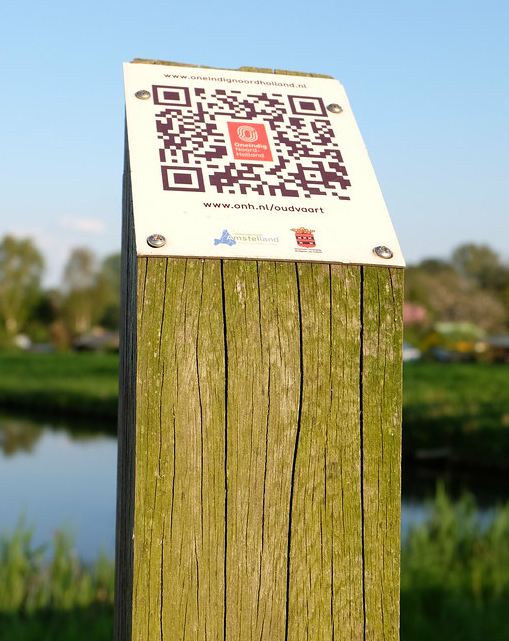
Add QR Codes to information notices to have associated information or text readout. The QR code on the post in the photograph links to an online recording providing information about the park. QR codes linking to a video demonstration can also be used on posters that demonstrate a skill e.g. baking or sports activity. During COV-19 QR codes were used on displays at venues to help track and trace the virus.
Marketing
QR codes could link course information in booklets to taster courses on your Virtual Learning Environment (VLE) or website, to videos of current learners talking about their course, or to online enrolment.
Open Days
Create QR Code tours for induction by placing the barcodes at various places within the building.
Provide examples of learners’ work with QR codes to hear more about it from the learners themselves.
Teaching, Learning, and Assessment
Bring paper-based resources to life by adding a QR code that links to videos and sticky boards such as Padlet.
Provide extra support or extension activities on a subject area by adding QR codes to tasks, projects, or assignments.
Provide task sheets that have solutions provided via the QR Code for self-assessment.
On employability courses, CVs could be designed with QR codes linked to a learner portfolio or to their digital CV.
Posters in a classroom could link to videos. For example, an image of a discount sign in a shop could have a QR code that links to a Calculating Percentages MathsEverywhere video on Youtube to support Functional Skills maths learners.
Equipment
Place QR codes on equipment/tools to explain what it is and how to use it. For example, weighing scales in a cookery class, using a lathe in the workshop, or a digital camera.
Evaluation
Use a QR Code to take a learner directly to an online survey tool such as Google Forms or SurveyMonkey.
Create your own QR code
QR Codes are created with a QR Code Generator such as QRStuff and they are scanned and read using a QR Code Reader App such as Kaspersky’s QR code reader and scanner (free).
Written for HOLEX by Ideas4Learning Limited
